Study until it clicks · any subject
Find out exactly where it went wrong.
Drop in your study guide, lecture slides, or screenshots of a practice quiz, and Circled turns them into short lessons and a practice test on exactly that material. Work it out by hand or snap a photo of your paper. When something's off, it circles the step that broke, says why, and shows the fix, so the mistake happens here and not on the test.
Recorded in Circled. The study material and the answers in these clips are examples written for the demo.
How it works
Work it out yourself. Get told exactly where it slipped.
Drop in your material
PDFs, PowerPoint slides, Word docs, screenshots of a practice quiz, or pasted notes. Circled works out the subject and topics and writes questions in the same style as your class.
Answer and show your work
Pick an answer or write one in your own words. Work it out with a pen tablet, a mouse, or a photo of your paper, right beside the question.
Check it
Written answers are graded on substance, not wording. Miss one and Circled shows what was missing, marks the step that broke, and gives you fresh questions until you get two in a row.
Subjects
Whatever's on your schedule.
If your class hands you material for it, Circled can teach it, quiz you on it, and check your answer. A few examples:
Features
Built for the way you're actually graded.
Check my work
The exact step, not just "incorrect."
A wrong answer usually comes from one place: a dropped sign, a unit that didn't cancel, a date out of order, a verb in the wrong tense. Circled finds that spot in your handwriting or your photo and puts the fix next to it.
Practice from your material
Your study guide in, a practice test out.
Drop in PDFs, slides, Word docs or screenshots of a practice quiz. Each session mixes short explanations with multiple-choice and written questions in the style of your class, built only from what you gave it.
- Questions match your practice quizzes, with new specifics
- "More practice on what I missed" at the end
- Sessions saved in your library to pick up later
Next step
Stuck? Get one line, not the whole answer.
Press N and the next line appears under where your work stops, in your notation. If your last line had a slip, you get the corrected version instead.
Written answers and redemption
A miss only counts once you get two right in a row.
Written answers are graded the way a good teacher would: strict on the idea, relaxed about wording. Miss one and you get fresh questions on the same idea until you get two in a row.
Homework mode
Bring any problem from any class.
Type it in, then work it out on screen or drop in a photo of your paper. Check it or ask for the next step. No answer key needed, and you only get one step at a time.
- Review · 6 due todayQuestions you missed, spaced out so they stick
- Biology exam · in 3 daysToday: finish the 2 questions left, then one more round
- Share these questionsClassmates get their own copy from the link
Between sessions
It remembers what you missed, and when your test is.
Missed questions come back the next day, then a few days later, then a week later, until you know them. Add a test date and the Today list tells you what to do each day until then.
- Spaced review of everything you missed
- A countdown and a daily plan for each test
- Share a set of questions with classmates as a link
- Sign in to keep it all on your phone and laptop
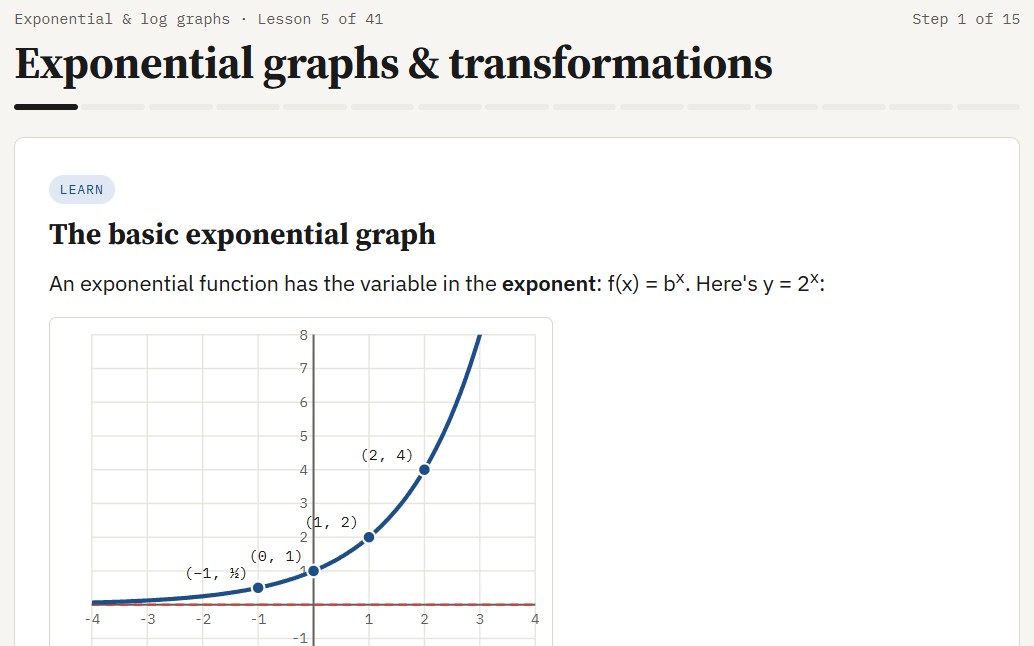
Built-in course: Precalculus
A full course when you want structure.
Fifteen hand-built lessons with graphing, a test calculator and new numbers on every retry, ending in a mixed review that runs like a test. More full courses are on the way.
- Logarithms and exponential graphs
- Interest, decay and half-life
- Polynomial division and rational functions
Focus blocks
Breaks that tell you what to look at next.
A focus timer runs while you study. At each break you see what you answered, how many you got first try, and which topics tripped you up.
Photos of your work
Rather work on paper? Bring the paper in.
Take a photo of your worksheet or notebook and add it to your notes. Circled checks it the same way it checks handwriting on screen, and you can draw on top of it.
Use the camera button, paste a photo, or drag one in. Or press the phone button, scan the code, and take pictures with your phone: they land in your notes on the laptop.
The photo sits under your ink. Circle things, add a line, or move it out of the way with V.
Check my work reads the photo like handwriting and circles the line that went wrong, right on the picture.
Gallery
Work from other students
Real problems, worked by hand and shared from Circled. Names and IDs are kept off, and every photo is checked before it appears.
For math and science
The test calculator, on screen.
A working re-creation of the TI-30XS MultiView layout lives in your notes, so chemistry, physics and math students practice the same keystrokes they'll use in the exam room. Try it here.
- 2 ^ 1 0 enter gives 1024
- log 1 0 0 0 enter gives 3
- Typing works too: numbers, + − × ÷, Enter
Pricing
Start free. Pay only when it's finals season.
No card to start. Free covers a normal week of studying; Pro is for heavy weeks and whole semesters.
Free
$0
- 15 checks, next steps and questions a day
- 2 sessions a week built from your material
- Spaced review, test dates and the Today plan
- Phone photos and shared question sets
Pro
$8/month
or $40 a year ($3.33 a month)
- Up to 400 checks, next steps and questions a day
- Up to 15 sessions a day, 24 MB of material each
- Everything in Free
- Cancel anytime
Semester pass
$25/4 months
- Everything in Pro for a whole semester
- One payment, no subscription
- It just ends; nothing to cancel
Prices in US dollars. Your instructor may have a class code that gives you Pro for the term. The Windows app works with your own Claude account instead and has no Circled limits.
Instructors
Try it with your class, free for a term.
Instructors get Pro free. For a class pilot we give you a code that unlocks Pro for every student in your section for the term, at no cost. Build practice from your own study guides, and your students get help that shows one step at a time instead of handing out answers.
Get updates
We'll email you when new features and courses ship. Nothing else.
FAQ
Questions people ask
What's the difference between the browser and Windows versions?
Same library, sessions, notes, calculator and timer. The browser version runs in one window (notes under the question, or in a second tab), works on any computer, and includes checking on the Free, Pro or Semester pass plan. The Windows app runs full screen on one or two monitors, turns screenshots into stickers, and checks your work through your own Claude account, with no Circled limits.
Does it just give me the answers?
No. Hints come one step at a time, the Questions panel gives hints before answers, and a missed question only counts as done after you get two fresh ones right in a row.
What gets sent when my work is checked?
A picture of your notes page (including any photo you added), the current question, and a short list of your recent mistakes so help fits your level. In the Windows app this goes to Anthropic through your own Claude account. In the browser it goes through our server to Anthropic. We don't store your pages; they stay on your device. See the privacy page.
Who sees the photos I share to the gallery?
No one, until we review it. Approved photos are public on the gallery page with the title, course and first name you chose. We strip location and camera data from every photo. Ask us and we'll take yours down.
Is it really free?
Yes. Free covers 15 checks, next steps and questions a day and 2 sessions a week from your material, with no card. Practice, review and test plans have no limit. Pro ($8 a month or $40 a year) and the Semester pass ($25 for four months, no subscription) raise those limits. If your instructor gave you a class code, enter it in the app for Pro at no cost.
Do I need an account?
No. Everything works without one and stays on your device. Sign in with your email (no password) if you want your sessions and review on more than one device.
Which classes does it cover?
Any subject you can write a question about: sciences, math, history, writing, languages, economics, psychology, computer science and test prep. Sessions are built from the material you drop in: study guides, slides, notes, and practice quizzes. There's also a full built-in Precalculus course, with more full courses coming.
How good is it outside math?
Good at explaining, quizzing and grading written answers in every subject above. For long essays it checks a paragraph or a thesis at a time rather than grading a whole paper. If an answer looks wrong to you, ask about it in the Questions panel; it will explain its reasoning.
What do I need to run it?
For the browser: a recent Chrome, Edge, Safari or Firefox. A pen tablet or touchscreen is nice but not required. For Windows: Windows 10 or 11. It's a portable app, so there's nothing to install.
Can I use it on my school's calculator rules?
The on-screen calculator matches the TI-30XS MultiView key layout for practice. Follow your instructor's rules for what's allowed on tests.